
Compare
Both tools rig and animate 2D characters with bones, meshes, weights, and IK. Spine focuses on 2D animation for games, and your code drives it at runtime. Rive is an engine: the animation, the interactive logic, and the data connections ship together in one file. Here’s where each one fits, with a source for every fact.

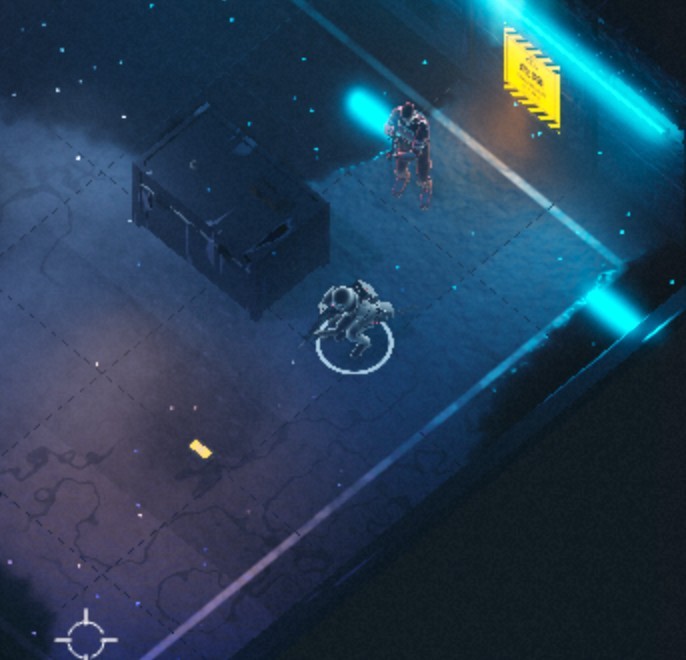
A game character drawn, rigged, and animated in Rive. Move your pointer to aim and click to fire. The State Machine handles both, and a shader lights the floor with the beam.
Pick Rive when
- Your character reacts in an app, site, or game UI, and the logic should ship inside the file. State Machine
- Your art is raster, vector, or both in one rig. Bones
- One file has to run on web, mobile, Unity, and Unreal. Runtimes
- You want MIT-licensed runtimes with no runtime fees. MIT license
- The character sits in a scene with UI, text, and layouts. Layouts
- The character shares the scene with 3D models and shader effects. GPU Canvas
Pick Spine when
- Your game code already drives animation through Spine’s runtime API. Spine API
- You want physics for hair and cloth, ready to use with no scripting. Spine physics
- Your engine has an official Spine runtime, like Godot, Phaser, or PixiJS. Spine runtimes
- You’d rather pay once. Essential and Professional include all future updates while your revenue and funding stay under $500K over the last 12 months. Spine pricing, license
- You animate on Linux. Spine system requirements
You can also use both. Each one drops into a game or app as its own component.
Side by side
Spine facts link to Esoteric Software’s pages and license. Rive facts link to the Rive docs, pricing, and blog. Checked October 28, 2026.
Interactivity ships in the file
In Rive, you build states, transitions, and pointer reactions in the Editor. Your code sets data, and the file decides what plays. In Spine, your code or your engine’s animation system picks and blends animations through the AnimationState API. State Machine, Spine API
Images and vectors in one rig
Rive bones bend images on meshes, and vector paths with their Bézier handles. Spine rigs images, with meshes on Professional. Bones, Spine meshes
Built-in physics, or your own with Scripting
Spine has a physics constraint for hair, cloth, and secondary motion, ready to use. Rive has no physics constraint: you add physics like gravity and springs with Scripting, and the script travels with the file. Spine physics, Scripting
One control drives many keys
Rive Joysticks scrub timelines from one handle, and a one-axis Joystick works as a slider. Spine Sliders apply an animation, driven by a keyed value or a bone’s movement. Joysticks, Spine Sliders
2D, 3D, and shaders in one file
In Rive, 3D models and WGSL shaders for lighting and effects sit in the same file as your character, built with Scripting, so the character can react to them. Spine focuses on 2D animation, and 3D and shader effects come from your engine. In Godot, for example, a Spine skeleton can join a 3D scene. GPU Canvas, Spine in depth, Spine in Godot
Feature by feature
Rigging
Rive and Spine Professional both build skeletons with bones, bend art with weighted meshes, and solve limbs with IK. The main difference is the art: Spine attaches images to bones, and Rive rigs vectors and images in the same skeleton.
One file
Design, motion, interaction, and logic live in one Rive file. Your agent writes it, your designers shape it, and open-source runtimes play that same file on web, mobile, desktop, consoles, smart TVs, and cars.
No translation
Developers and agents don’t rebuild your design in code. They load the file and bind data to it.
No handoff
Agents, designers, and developers all work on the same file.
No drift
Change the file, and every platform gets the same change.


FAQ
Straight answers, including when Spine is the better fit.
Which one fits a game character?
Both do. If your game code already drives Spine’s runtime, or your engine has an official Spine runtime like Godot, Phaser, or PixiJS, Spine fits well. If you want the reactions built in the Editor and shipped inside the file, pick Rive. Both rig raster images, and Rive also rigs vectors.
Can I bring my Spine characters into Rive?
There’s no Spine importer. You rebuild the rig in Rive from your original art. A coding agent can help with the Rive CLI, but treat its result as a starting point and check bones, weights, and IK in the Rive Editor.
What do the runtimes cost?
Rive runtimes are MIT-licensed, with no royalties or runtime fees. Spine runtimes come with a Spine Editor license, and its terms set rules for how you integrate and ship them.
Can I use both?
Yes. Each runtime is its own component, so a game can run Spine characters and a Rive HUD, or the other way around.
In production
Teams at Spotify, Duolingo, Disney, and Riot Games ship with Rive. Here’s what they and independent builders say about it.














Join our newsletter
Get all the latest Rive news delivered to your inbox.